
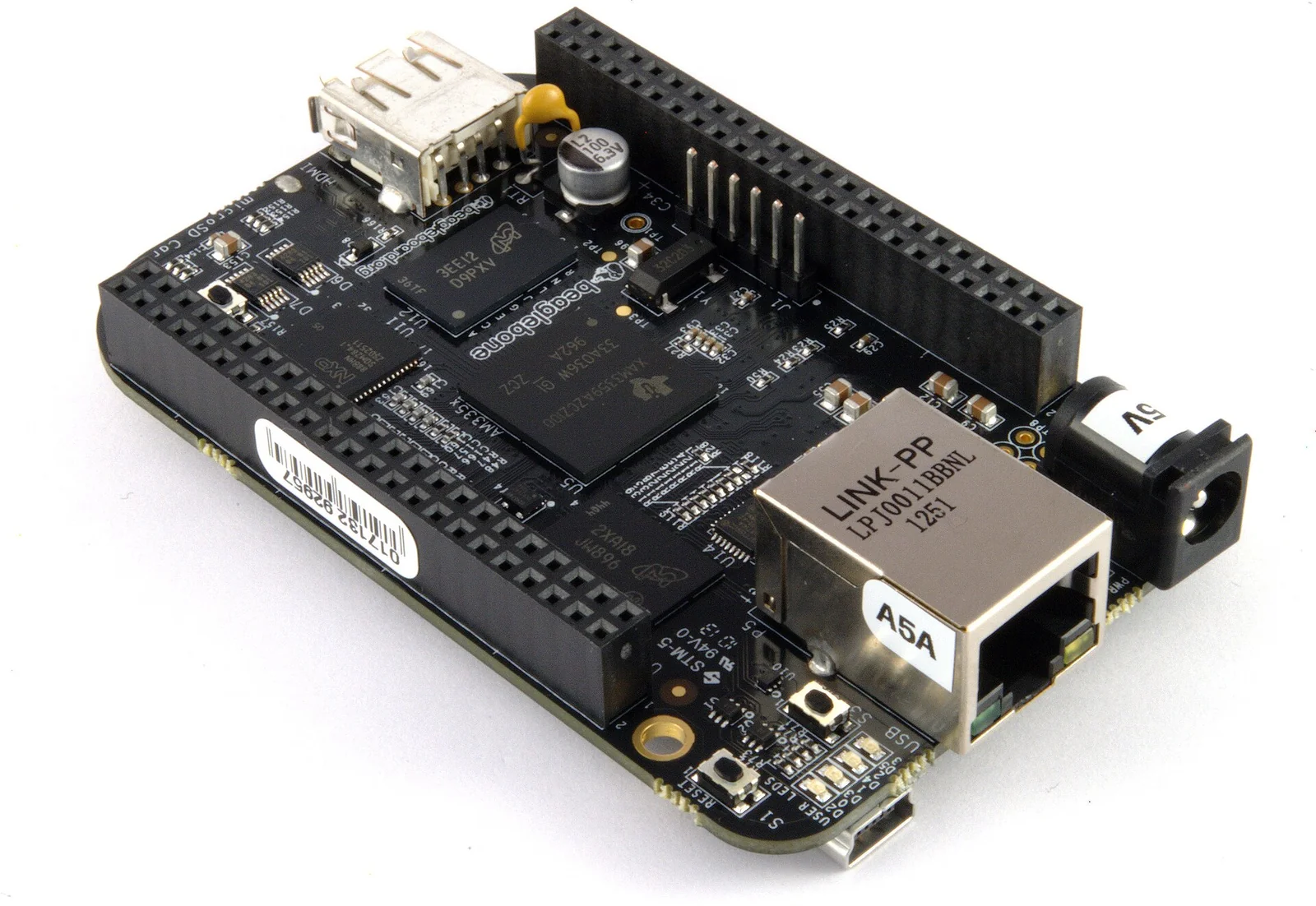
On a $45 board, the BeagleBone Black puts two 200 MHz microcontrollers — the PRUs — next to the ARM Cortex-A8 core that runs Linux. Among the same-price single-board computers of 2013, that is a rare trait. The rest of the board — 512 MB of DDR3, 2 GB of eMMC, an HDMI output, 10/100 Ethernet — is what one expects from an ARM SBC in 2013. The PRUs are not.
Context
BeagleBoard.org has been selling boards built on Texas Instruments Sitara SoCs since 2008. The BeagleBone line, smaller and cheaper than the original BeagleBoards, had already arrived in 2011 with its first revision: around $90, built on the AM3359. That board already carried an AM335x-family SoC and integrated the PRU-ICSS subsystem with two 200 MHz cores. The PRUs do not begin with the Black. The Black, announced in April 2013, drops to $45 by adopting the AM3358 — a sibling of the same AM335x — and adds on-board flash.
The obvious comparison in 2013 is the Raspberry Pi Model B, out a year earlier at $35. The two boards address partly different audiences: the Pi is built for education and media (its Broadcom BCM2835 SoC has a very capable VideoCore IV GPU), the BeagleBone Black foregrounds I/O towards the physical world. The difference shows less in the CPU figures and more in what sits around them.
Architecture
At the centre sits the TI AM335x, a 1 GHz Cortex-A8: a single core, in-order, with NEON and VFP — the same class as the Cortex-A8 found on many boards of the time. Beside the main core, on the same die, the SoC integrates the PRU-ICSS subsystem (Programmable Real-Time Unit and Industrial Communication SubSystem): two 32-bit cores at 200 MHz, each with its own instruction set, dedicated local memory and direct access to the I/O pins.
The PRUs do not share the Cortex-A8 pipeline and do not pass through the Linux scheduler. They run code deterministically: each instruction takes one cycle (5 ns at 200 MHz), bar accesses to external memory. So a loop written on the PRU toggles a pin with negligible jitter, while the same loop on the Cortex-A8 — crossing kernel, interrupts and scheduler — builds up variable latencies in the order of microseconds or worse.
The board brings its signals out on two 46-pin headers (connectors P8 and P9). Across those 92 contacts, once power and reference pins are set aside, sit general-purpose GPIO, up to seven UARTs, SPI, two I2C buses, hardware PWM generators (eHRPWM), capture modules (eCAP), a CAN controller and seven inputs of a 12-bit ADC. Many pins are multiplexed: the effective function is chosen through pinmux, and on the 2013 Black some are already taken by the lines towards the eMMC and HDMI.
On the 2 GB of eMMC the board ships with an Ångström image pre-installed, toolchain and development tools already in place. It boots from eMMC with no microSD; the slot stays free for alternative images or for re-flashing the eMMC itself.
The critical point
The practical issue with the PRUs, in 2013, is software. Two deterministic cores on the die are not enough: they must be programmed, loaded and made to talk to the Linux running on the Cortex-A8.
The reference toolchain is the one from Texas Instruments: the pasm assembler and PRU Assembly, plus the prussdrv library (in userspace, on top of the uio_pruss driver) to load firmware into a PRU’s instruction memory, start it, stop it and exchange data through shared memory. Anyone who has worked with DSPs or coprocessors will feel at home: write a small firmware, build it separately, load it and synchronise it with the main application.
Data goes through mapped RAM regions — each PRU’s data RAM plus a shared memory — and through an interrupt mechanism the PRUs raise towards the host. On the PRU there is no operating system and no abstractions: you work at the level of registers and addresses. For people coming from microcontrollers this is familiar ground; for those who know only application Linux it is a different way of thinking, and the 2013 documentation is fragmented — much of the practice circulates on forums and in community examples rather than in a single manual.
Then there is the device tree. The Black’s kernel uses Device Tree Overlays to reconfigure the pinmux at runtime and bring up peripherals on P8/P9. A wrong overlay, at best, leaves a pin that does not toggle; at worst, it clashes with a line already assigned to the eMMC.
Implications
Where tight timing is needed, the PRU moves the problem outside Linux rather than fighting it with real-time kernel patches. Generating pulse trains for stepper motors, decoding a non-standard serial protocol, driving LED strips with nanosecond timing, reading a high-frequency encoder: these are tasks where a Cortex-A8 under Linux struggles because of non-deterministic latency, while a dedicated core handles them without detours.
The other effect concerns positioning. CAN, ADC, hardware PWM and PRU push the BeagleBone Black towards control and acquisition — the ground where one would so far have placed a microcontroller next to a computer. Here both worlds live on the same SoC: Linux for networking, application logic and interface, the PRUs for close contact with the signals.
Limits
The PRUs are not general-purpose: no cache, no floating-point unit, no operating system. Everything must fit in the few kilobytes of instruction memory and be written at a low level. For many projects the trade is not worth it, and handling I/O straight from the Cortex-A8, accepting its jitter, is perfectly fine.
Documentation and tooling, as of April 2013, are the rawest part. The AM335x and its PRU-ICSS are well described in TI’s Technical Reference Manual, but getting from theory to working firmware means gathering scattered information. Anyone adopting the board for the PRUs should budget learning time and a few sessions reading registers.
On the media side, finally, the AM335x favours I/O over graphics: 3D acceleration is limited and HDMI serves more for a service console than for heavy video. Against boards with more capable GPUs the comparison is uneven, but it is a choice consistent with what the board sets out to do.
- https://beagleboard.org/black
- https://www.ti.com/product/AM3358
- https://www.ti.com/lit/ug/spruh73/spruh73.pdf
- https://github.com/beagleboard/am335x_pru_package
- https://www.noze.it/en/insights/beaglebone-black/
Cover image: Top-down view of the BeagleBone Black single-board computer showing the central SoC, the two black P8 and P9 pin headers along the… — photo by Gareth Halfacree, CC BY-SA 2.0 — https://commons.wikimedia.org/wiki/File:Beaglebone_Black_-_Top_(14491195107).jpg