
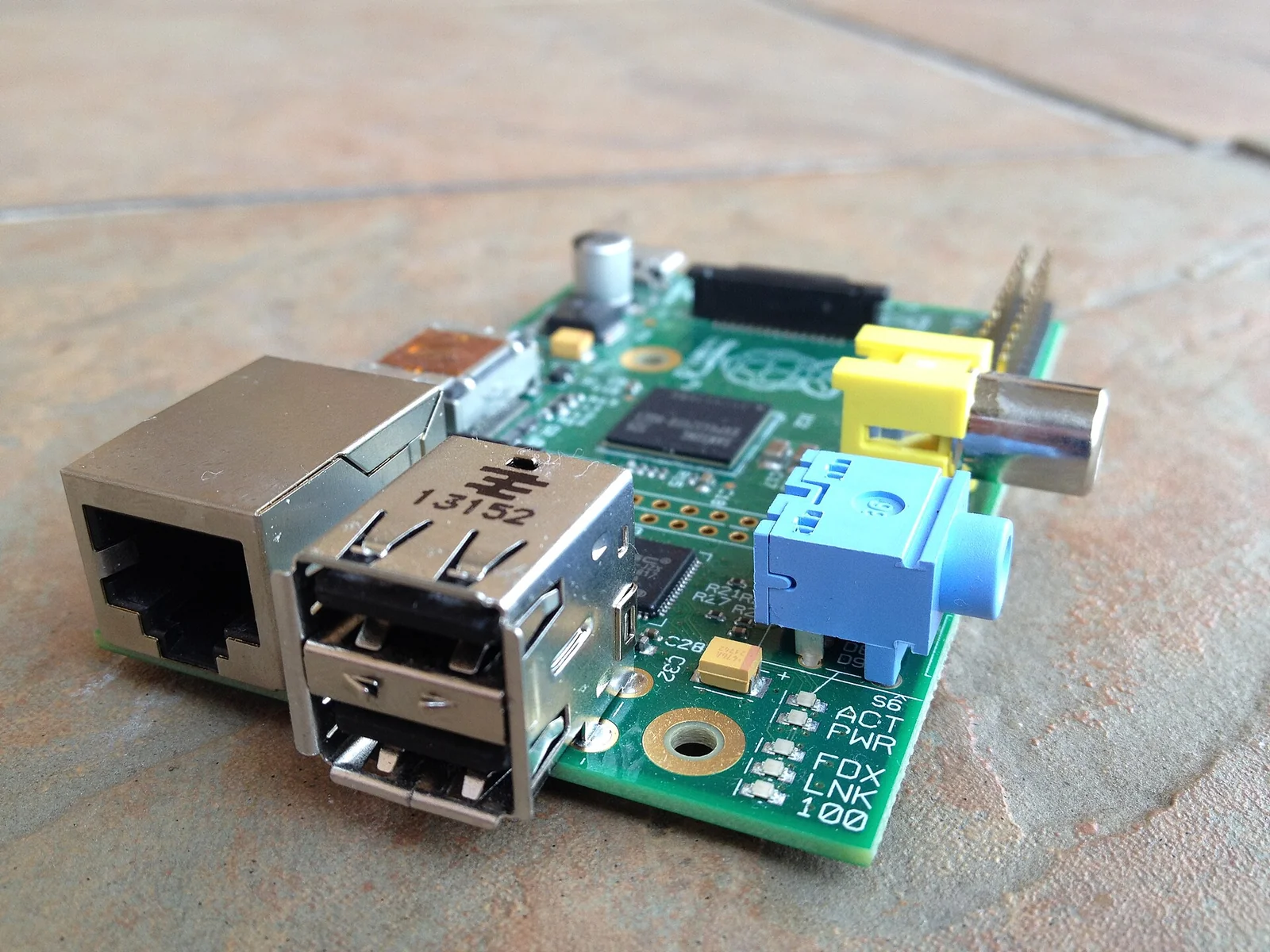
On 29 February 2012 the Raspberry Pi Foundation put the Model B on sale, a 35-dollar single-board computer built around the Broadcom BCM2835 SoC. The first tens of thousands of units were gone within hours, and the websites of both distributors, RS Components and Premier Farnell, went down under the load. Past the noise, the board matters to anyone teaching computing for a specific reason: it is cheap enough to be broken, and complete enough to be understood in full.
Background
The foundation grew out of an observation made in 2009 by Eben Upton and others at the Cambridge Computer Laboratory. Students arriving to read computer science had less programming practice than the generation raised on machines like the BBC Micro, where switching the computer on meant facing a prompt and a BASIC interpreter. The hypothesis is that the decline owes something to the disappearance, at home, of a computer one can experiment with free of any fear of damaging the household’s working machine. A 35-dollar machine puts that room for experiment back within reach of a school or a single student.
Architecture
The Model B carries the BCM2835, a SoC integrating an ARM1176JZF-S CPU at 700 MHz (ARMv6 architecture, with a floating-point unit) and a VideoCore IV GPU. The RAM is 256 MB. The board has no built-in mass storage: the operating system boots from an SD card. For connectivity there are two USB 2.0 ports, a 10/100 Ethernet port, HDMI and composite video output, a 3.5 mm analogue audio jack, and a 26-pin GPIO header, exposing general-purpose digital lines alongside serial buses such as I2C, SPI and UART. Power is 5 V over micro-USB, drawing on the order of a few watts.
The reference operating system at launch is a Debian Squeeze adapted for ARMv6. Being Linux on a documented platform, the whole stack — kernel, init, shell, toolchain — is open to inspection by the student, who can recompile, swap components and read the code of what they are running. This is the teaching property the foundation is after: a device whose every layer can be followed, not merely one that runs programs.
The critical point
One layer, however, does not lend itself to inspection, and it is the first to run. On this platform it is not the ARM CPU that starts but the VideoCore GPU. At power-on a small core inside the GPU runs a first-stage bootloader held in ROM, which mounts the SD card and loads bootcode.bin; this brings up the SDRAM and in turn loads start.elf, the GPU firmware, which initialises the system and finally hands control to the ARM CPU, having it load the Linux kernel. In practice it is the GPU that governs boot, with the CPU depending on it: the usual hierarchy is reversed.
The files bootcode.bin and start.elf are proprietary Broadcom binaries, shipped without source. The earliest stage of boot — the one deciding how much memory goes to the CPU and how much to the GPU, and initialising the video hardware — therefore stays a closed box even on a board made to be opened and studied. For a teacher it is an honest detail to put on the table: the inspectability of a system is not a property of the device as a whole but changes layer by layer, and the boundary of what can be read often coincides with the commercial boundary of whoever supplied the silicon.
Implications for teaching
The GPIO header is why the Model B works as a teaching tool beyond software too. A pin driven high or low from a line of shell, and an LED that lights up as a result, make tangible a boundary that usually stays abstract in a lecture: the one between a value in memory and a physical effect in the world. From there complexity rises in steps — a button read as an input, a temperature sensor on I2C, a piece of software control becoming an observable behaviour — without first having to build an entire infrastructure. And because the same board is a full Linux computer, you work in a high-level language and still talk to the pins, with no cross-compilation toolchain in between.
The SD card as the only boot medium carries a pedagogical value that is easily undersold. An image corrupted by an experiment gone wrong is rewritten in a few minutes, and a class can work on different images simply by swapping cards. The cost of a mistake tends to zero, and with it falls the threshold past which a student stops trying for fear of breaking something. It is the same logic that, by the foundation’s account, made the BBC Micro fertile ground: a dedicated machine, where getting it wrong has no consequences.
Limits
It is worth keeping expectations anchored to the numbers. An ARMv6 CPU at 700 MHz with 256 MB of RAM is a modest machine: the graphical desktop is slow, compiling non-trivial software takes patience, and several packages built for ARMv7 will not run without recompilation. Boot and storage depend entirely on the SD card, and it is often its throughput and its reliability under repeated writes that form the real bottleneck, ahead of the CPU.
Then there is the flip side of being cheap. A 35-dollar board with no enclosure, no guaranteed power supply and no SD card in the price offloads part of the cost and care onto the user, and in a school that turns into setup labour and into faults from marginal power that look like software bugs. Better to know in advance where the machine is fragile, because that knowledge is part of what, on a platform like this, you end up teaching.
- https://www.raspberrypi.org/
- https://www.raspberrypi.org/app/uploads/2012/02/BCM2835-ARM-Peripherals.pdf
- https://www.debian.org/releases/squeeze/
- https://www.noze.it/en/insights/raspberry-pi-1-model-b/
Cover image: Top-down view of a first-generation Raspberry Pi Model B board on a light surface: green PCB with the central Broadcom SoC, two USB… — photo by Justin417, CC BY-SA 3.0 — https://commons.wikimedia.org/wiki/File:Raspberry_Pi_Model_B.JPG