
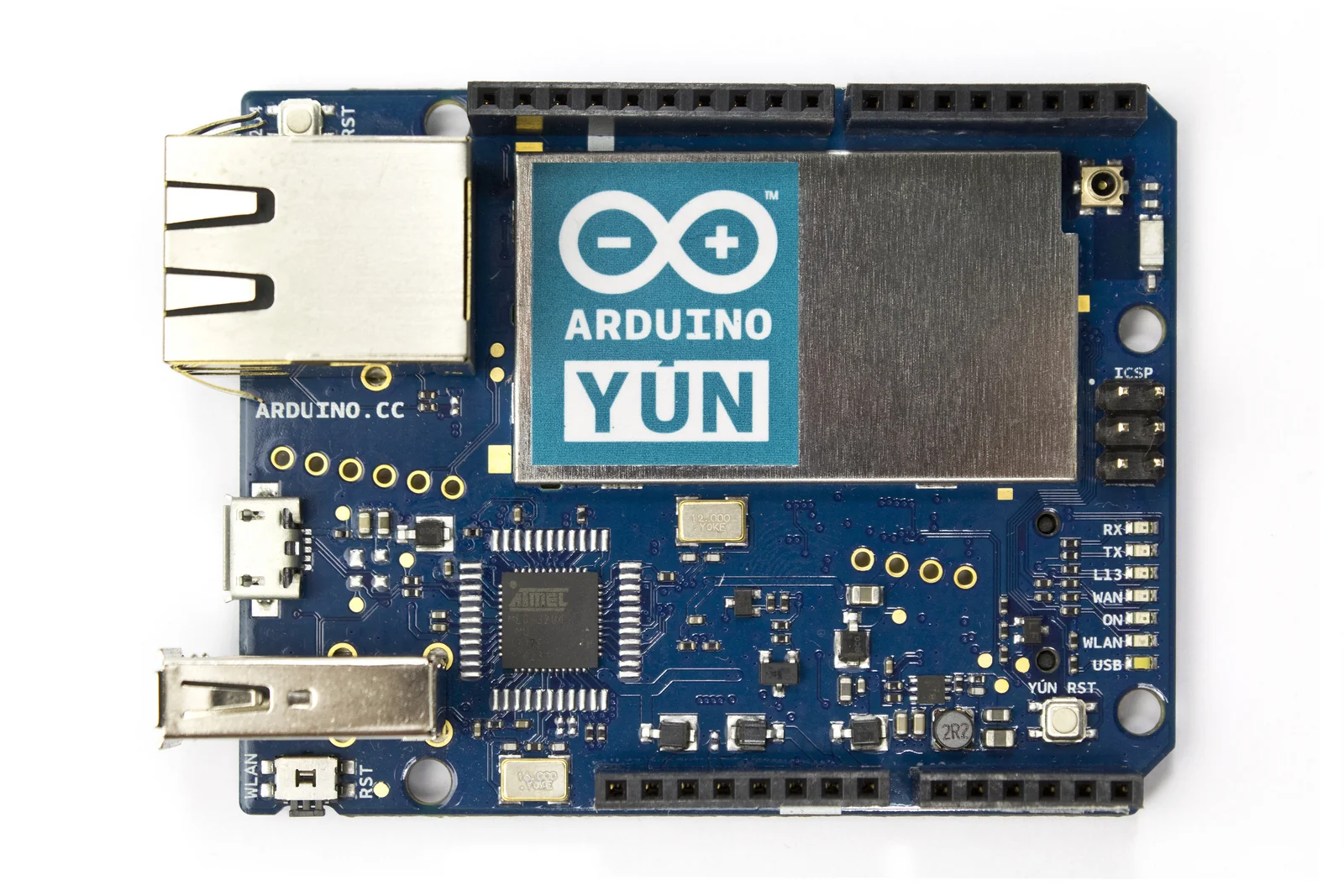
The Arduino YÚN holds two processors on a single board that until now lived on separate ones: an 8-bit AVR microcontroller and a MIPS System-on-Chip (SoC) running Linux. The idea itself is not new — anyone who wanted network connectivity from an Arduino was already placing a router with OpenWrt next to the board and having the two talk over a serial line — but it is the first time this pairing arrives integrated into the official Arduino line, with a library acting as the bridge.
Context
Until now, to give an Arduino sketch IP connectivity you added an Ethernet or WiFi shield, with a network stack running on the AVR’s few kilobytes of RAM. That is fine for simple HTTP requests to a known endpoint; it gets awkward the moment you need TLS, DNS, parsing of JSON responses of any size, or a request queue. The microcontroller has neither the memory nor the operating system to handle these things well.
In the maker community the practice was already something else: take a cheap router with an Atheros SoC, install OpenWrt — the embedded-Linux distribution most common on this class of hardware — and connect it to the Arduino over a serial port. The router acts as a gateway: it keeps the WiFi link up, resolves names, handles TLS, exposes a small web server; the Arduino stays on the pins, reading sensors and driving actuators with deterministic timing. The YÚN formalises this scheme by putting both chips on the same PCB.
Architecture
The YÚN’s two processors are:
- ATmega32U4 — the 16 MHz AVR already fitted to the Arduino Leonardo. Same 14 digital pins (7 with PWM, 12 usable as analogue), native USB, standard Arduino sketches. This is the real-time side: the loop runs with no operating system beneath it, so pin response times are predictable.
- Atheros AR9331 — a 400 MHz MIPS 24K SoC with 802.11n WiFi (1x1, up to 150 Mbps on 40 MHz channels), Ethernet and USB host support. It is the same silicon found inside many cheap WiFi routers, and it is well covered by OpenWrt. On this chip runs Linino, a build of OpenWrt adapted to the board by dog hunter, with signed packages and the Python and shell interpreters already on board.
The two chips talk over an internal serial line. That is where everything passes: anything the sketch wants to do on the network becomes a message sent to the Linux side, which runs it and returns the result.
The bridge
The thing that wraps that serial line is the Bridge library. On the sketch side you write ordinary Arduino code; underneath, the library serialises the request, sends it to the AR9331 and reads the reply. The Linux side, on the sketch’s behalf:
- runs shell commands and reads their output, so it delegates any processing too heavy for the AVR to a Linux program;
- reads and writes files on the microSD card or the filesystem, giving the sketch a persistence the AVR alone does not have;
- opens HTTP connections, with DNS and TLS on Linux’s account rather than the microcontroller’s;
- exposes a shared value store, readable over REST from the small web server listening on the Linux side.
The point is delegation: the microcontroller never learns to speak TCP/IP, it keeps doing what it does well, and when the network is needed it hands the job to the processor next door. It is the same division of labour as Arduino-plus-router, reduced to a library call instead of a protocol you had to invent.
On the integration side, Arduino has announced support for Temboo, a service that brings access to around a hundred third-party APIs (social, payments, logistics) together in a single point. Handy for not hand-writing a client for every service, but it moves part of the logic off the board, into a service run by others — a dependency to factor in.
Critical point
What really changes is not connectivity in itself: the board now carries a full operating system, with its own life cycle. The AVR behaves in a basically fixed way: you load the sketch, it runs. The AR9331 with Linino is a small Linux system with its packages, its network configuration, its services starting at boot and — like any connected device — its attack surface. It should be treated the way you treat a router: default passwords to change, exposed services to restrict, updates to follow. A board that used to begin and end in firmware now has, in effect, a second computer to administer.
The second cost is skills. The maker used to the Arduino IDE alone now faces SSH, opkg, OpenWrt configuration files, IP networking. It is not an insurmountable barrier, but it shifts the YÚN towards people already somewhat at home with systems: labs, technical courses, teams prototyping connected objects in earnest.
Limits
The announced price is 69 dollars plus tax, several times an Arduino Uno: the YÚN does not replace the base board, it is for cases where Linux on board is genuinely needed. For many connected projects a WiFi shield on an Uno, or a separate router already in the house, stay cheaper. The WiFi is 1x1: throughput and range are those of a small router SoC, not of a dedicated access point. And the internal serial bridge is itself a bottleneck: moving large volumes of data between AVR and Linux through that channel is slow, so the scheme works best when the pins produce small, frequent data rather than heavy streams.
Whether this two-chip architecture becomes the basis of a family or stays an isolated case remains to be seen. The technical direction — a deterministic processor for the pins, a processor with an operating system for the network — is sound, and it turns up wherever real-time timing and connectivity have to be held together.
https://blog.arduino.cc/2013/05/18/welcome-arduino-yun-the-first-member-of-a-series-of-wifi-products-combining-arduino-with-linux/ https://github.com/Deoptim/atheros/blob/master/AR9331.pdf https://openwrt.org/ https://arduino.cc/en/Main/ArduinoBoardYun https://www.noze.it/en/insights/arduino-yun-linux-iot/
Cover image: Front view of an Arduino YÚN board: a teal-blue PCB with USB and Ethernet connectors, rows of pin headers, and the two main chips… — photo by Arduino SA, CC BY-SA 3.0 — https://commons.wikimedia.org/wiki/File:ArduinoYunFront_2.jpg