
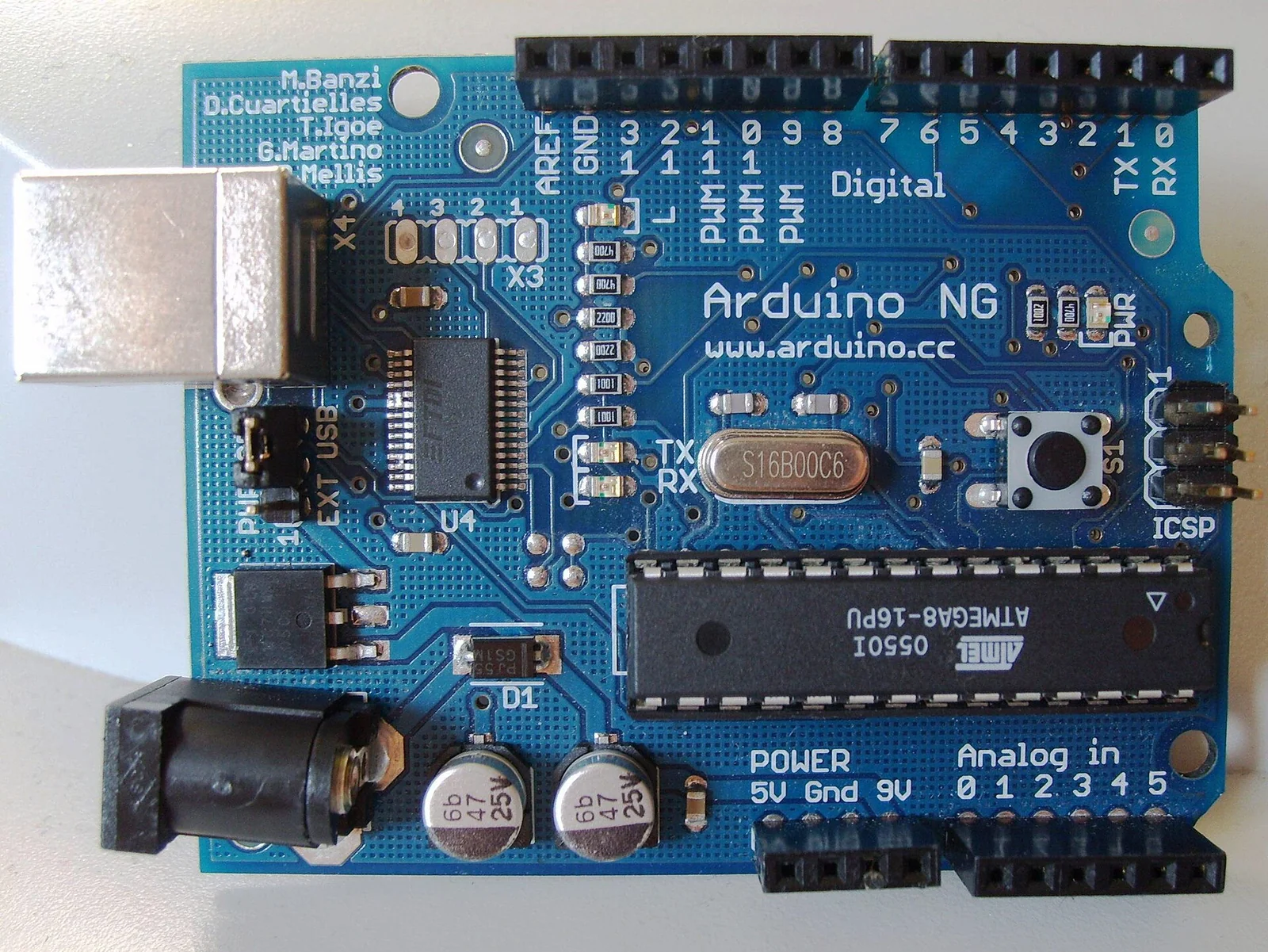
A microcontroller board called Arduino is going around the Interaction Design Institute Ivrea (IDII), with its circuit schematics published under a licence that permits copying. It carries an Atmel ATmega8, is programmed from an environment derived from Processing, and costs, in parts, under thirty euros. I have worked through the technical choices that set it apart from the teaching platforms I have used so far.
Context
IDII is the interaction-design school opened in Ivrea in 2001 with Olivetti/Telecom Italia funding. It trains people who work across electronics, programming and use-centred design, and who therefore have to prototype interactive objects without an electronics-engineering background behind them.
Anyone who has run a lab knows the practical problem: the tools that exist demand an outlay the non-technical student cannot justify. Parallax’s BASIC Stamp is simple to program but dear per board, and its PBASIC interpreter runs on a PIC with few resources. Programming a PIC directly, or an AVR with Atmel’s STK500, means fighting with toolchains, dedicated programmers and datasheets. The step from “I have an idea” to “I can see the LED blink” is too high.
Architecture
At the centre of the board is the ATmega8, an 8-bit AVR microcontroller. From the Atmel datasheet: 8 KB of programmable flash, 1 KB of SRAM, 512 bytes of EEPROM, a 10-bit A/D converter, operation up to 16 MHz. Around the chip sit a regulator, a crystal, connectors for the digital I/O pins and the analogue inputs, and a serial interface for loading code.
The part that interests me most is the bootloader. A small resident program is already written onto the chip; at power-up it listens to the serial port for a moment, writes a new sketch into flash if one arrives, and otherwise hands control to the user program. The protocol is the STK500 one, which the AVR tools already know. The result: loading code needs no external hardware programmer, the serial port you already have is enough. The cost and the number of things that can go wrong in a classroom fall together.
The board’s schematics and the printed-circuit layout are published. Anyone with access to a lab can rebuild the board, modify it, run off a small batch. Here the licence weighs as much as the electronics: it separates a tool you buy from one you study by taking it apart.
The programming model
The environment inherits from the Wiring project, which Hernando Barragán has developed since 2003 as a master’s thesis at IDII, with Massimo Banzi and Casey Reas as supervisors. Wiring in turn rests on Processing, the visual-coding environment that came out of Reas and Ben Fry’s group at the MIT Media Lab. From that lineage comes the editor: a Java window with one button to compile and one to upload, with no makefile in sight.
The user program — the sketch — runs around two functions:
void setup() {
  // run once at power-up
}

void loop() {
  // repeated indefinitely
}
Beneath it is C++, compiled with avr-gcc and linked against avr-libc. The environment hides the toolchain: whoever writes digitalWrite(13, HIGH) need not know they are writing to a port register, nor recall the register’s name. For a prototyping course this is exactly the point: you teach the cause-and-effect relation between code and the physical world, and register arithmetic is put off.
The critical point
The choice that seems decisive to me is the separation of two things usually sold together: ease of use and a closed system. The BASIC Stamp is easy because it hands you an interpreter and hides everything, including the right to look inside. Arduino hides the complexity at the surface — setup(), loop(), the one-button editor — yet underneath it stays standard C++ on a documented AVR, with open schematics and a free toolchain. Whoever wants to stop at the blinking LED stops there; whoever wants to read the ATmega8 datasheet and write to the registers by hand finds the bare chip under the abstraction, with no walls.
This property does not come for free: it depends on having chosen a microcontroller with a mature free compiler (avr-gcc) and a documented C library (avr-libc). On a platform with a proprietary compiler or a closed interpreter, the same abstraction layer would have been a cage rather than a door.
Implications
If the IDII experiment holds, the interesting thing is that the board’s design can be copied, more than the board itself. A closed teaching board lives as long as the manufacturer sells it; one with published schematics can be rebuilt, adapted to a specific course, run off in a small batch by whoever teaches. For schools on tight budgets and for self-organised labs the sum changes: the tool becomes a modifiable starting point, to adapt rather than to buy again.
I also expect an effect on the kind of documentation that circulates. When schematics are public, code examples, the add-ons that plug into the connectors, and the notes of whoever has solved a problem become shared property, instead of staying locked inside a vendor’s support channel. It is the same mechanism as free software, applied to an object you hold in your hand.
Limits
The above describes the situation in June 2005, and should be taken with due caution. The ATmega8 has 8 KB of flash and 1 KB of SRAM: enough to read sensors, drive actuators, and handle some simple communication, but not for applications that ask for much memory or much computation. The serial port for uploading wants an adapter on a computer with no physical serial line. The Java environment is convenient but heavy compared with a command-line compiler, and its stability across all platforms remains to be proven in the field.
There remains the question of durability: IDII is going through funding difficulties and its continuation is not assured. Whether a project born inside a school can outlive the school that produced it is exactly the test that open schematics ought to pass. We will only be able to say once we see who, outside Ivrea, picks up those files and builds on them.
- https://www.arduino.cc/
- http://wiring.org.co/
- http://www.processing.org/
- https://ww1.microchip.com/downloads/en/DeviceDoc/Atmel-2486-8-bit-AVR-microcontroller-ATmega8_L_datasheet.pdf
- http://www.nongnu.org/avr-libc/
- https://www.noze.it/en/insights/arduino-origini-ivrea/
Cover image: Top view of an early Arduino board with an Atmel ATmega8 microcontroller, voltage regulator, crystal, I/O pin headers and serial… — photo by DustyDingo, public domain — https://commons.wikimedia.org/wiki/File:Arduino_top-1.jpg